

If you've been posting on LinkedIn, you've probably noticed the "impressions" metric under your posts. But what exactly does it mean? And more importantly, how can you increase it?
Understanding impressions completely changed how I approach my LinkedIn content strategy. In this guide, I'll break down what LinkedIn impressions are and practical strategies to increase them using tools like Carousify.
What Are LinkedIn Impressions?
LinkedIn impressions are the number of times your content appears on someone's screen. It doesn't necessarily mean they read your post – it simply means your content showed up on their device.
LinkedIn counts an impression when:
- Your content appears at least 50% in view
- For at least 300 milliseconds
- On a signed-in member's device
Even if someone is quickly scrolling and your post flashes by, that counts as an impression!
Impressions vs Reach: What's the Difference?
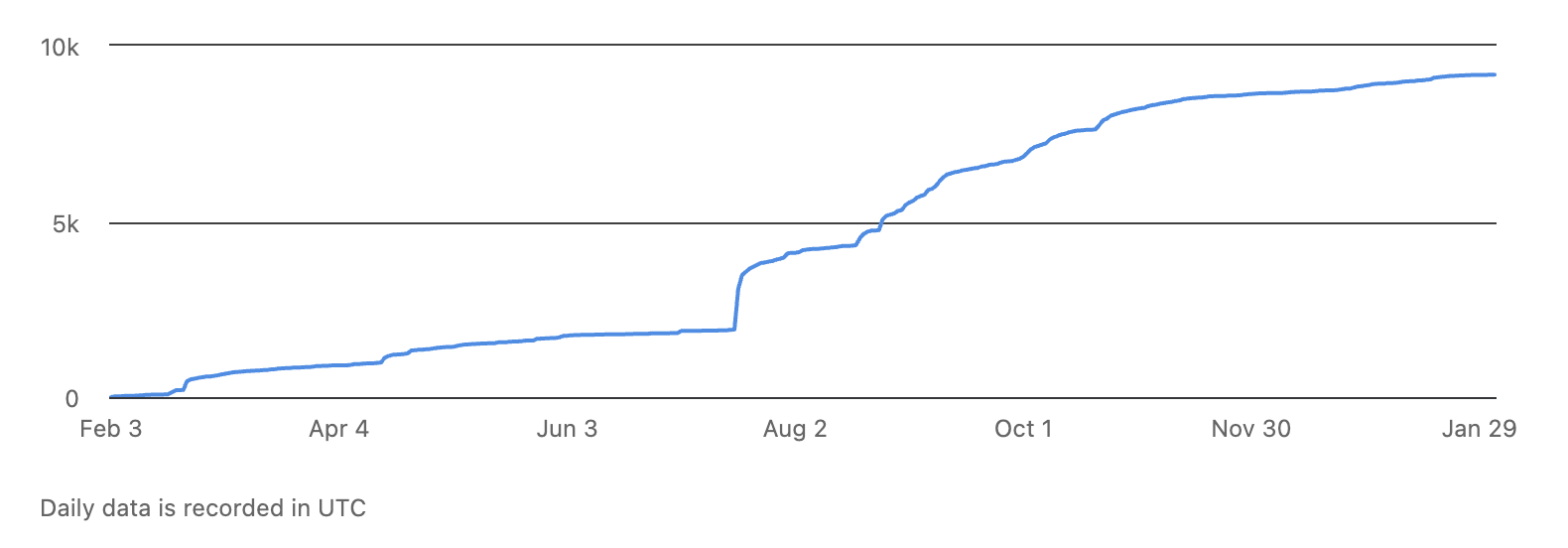
LinkedIn Impressions
- Impressions = Total number of times your content was displayed (includes multiple views by the same person)
- Reach = Number of unique people who saw your content
- Example: If 500 people saw your post, but some saw it twice, you might have 1,000 impressions but only 500 reach.
Types of LinkedIn Impressions
LinkedIn tracks three types of impressions:
- Organic Impressions – Views from your direct network and their connections, completely free.
- Paid Impressions – Views from LinkedIn ads or sponsored content that you pay for.
- Viral Impressions – Views beyond your immediate network from shares and engagement. This is the holy grail!
What's Considered a Good Number of Impressions?
This is the question everyone asks!
The honest answer is: it depends on your network size and engagement quality.
Here are some general benchmarks:
| Account Type | Average Impressions | Good Performance | Excellent Performance |
|---|---|---|---|
| Personal Profile (Small network) | 500-1,000 | 1,000-3,000 | 5,000+ |
| Personal Profile (Large network) | 2,000-5,000 | 5,000-10,000 | 20,000+ |
| Company Pages | 5,000-10,000 | 10,000-25,000 | 50,000+ |
I remember when I was getting just 300-400 impressions per post. After implementing the strategies I'm about to share, I'm now consistently hitting 3,000-5,000 impressions!
Aside from post impressions, LinkedIn also shows impressions for comments. Whenever someone views your comments, you’ll see impressions on them similar to post impressions
How to Increase Your LinkedIn Impressions
Now for the good stuff – let's talk about strategies that actually work!
1. Post at the Right Time
Timing matters more than you think!
Based on what I've tested and what the data shows, here are the best times to post:
- Tuesday to Thursday: 7:00 AM - 9:00 AM (before work)
- Tuesday to Thursday: 12:00 PM - 1:00 PM (lunch break)
Avoid:
- Fridays (engagement drops significantly)
- Weekends (unless your audience is specifically active then)
The first 60-90 minutes after posting are crucial. That's when LinkedIn's algorithm decides if your post is worth showing to more people.
2. Write Posts That Stop the Scroll
Your first 1-2 lines appear above the "see more" button, so they need to be compelling!
Instead of: "I want to share some thoughts about productivity..."
Try this: "I wasted 3 years working 12-hour days before I learned this..."
Use controversial questions, surprising statistics, or bold statements to hook readers.
3. Use the Right Content Format
Top Performers:
- Carousels/PDFs: 2x more engagement than average posts
- Native videos: Up to 5x more engagement
- Polls: Encourage participation
Still Good: Images (2x more comments) and text posts
Lower Performance: External links (LinkedIn prefers to keep people on platform)
This is where Carousify becomes incredibly useful!
4. Use Carousify to Create High-Performing Content
I started using Carousify a few months ago, and it's transformed my LinkedIn content game.
Why Carousify helps increase impressions:
- Easy Carousel Creation – Hundreds of pre-designed templates customizable with your brand. What took 2-3 hours in Canva now takes 15 minutes!
- AI Content Generation – Get engaging post ideas and refine your content with AI that understands LinkedIn's professional tone.
- Content Repurposing – Convert PDFs into LinkedIn posts, YouTube videos into carousels, and blog articles into threads. One blog post becomes 5-6 LinkedIn posts!
- Smart Scheduling – Schedule posts for optimal times when your audience is most active. I batch-create on Sundays and schedule for the week.
- Analytics Dashboard – Track which posts get the most impressions, best posting times, and preferred content types.
Pricing: Starting at $4.99/month with 3 LinkedIn accounts. I'm using the Startup plan ($9.99/month) and it's worth every penny!
5. Post Consistently
Best frequency: 4-5 posts per week (once per weekday)
I post 4 times a week and have seen my average impressions increase by 60% compared to posting randomly. Carousify's scheduling feature makes consistency easy!
6. Engage Immediately After Posting
The first 60-90 minutes determine your post's reach. Reply to every comment within the first hour, and share your post to relevant groups.
7. Write Longer Posts (800-1,000 Characters)
Posts with 800-1,000 characters get 26% better engagement. But don't add fluff – every sentence should add value!
8. Use Strategic Commenting
Add genuine value in comments, share your experience, and comment on posts from larger accounts. I've had comments with 3,000+ impressions!
Common Mistakes That Kill Your Impressions
- Mistake 1: Using Too Many Hashtags – LinkedIn recommends 3-5 relevant hashtags. Using 15-20 looks spammy and reduces reach.
- Mistake 2: Posting Links Without Context – Post your content first, let it get engagement for 30-60 minutes, then add the link in the first comment.
- Mistake 3: Ignoring Comments – Reply to every comment, especially in the first hour. LinkedIn notices when posts create meaningful conversations.
- Mistake 4: Being Too Salesy – Follow the 80/20 rule: 80% valuable content, 20% promotional.
My Results After Implementing These Strategies
Before: 350-500 impressions per post, posting randomly 1-2 times per week
After 3 months: 3,000-5,000 impressions per post, posting 4 times per week with Carousify
What made the biggest difference: Using Carousify for carousels, posting consistently at 8 AM Tuesday-Thursday, and engaging in comments within the first hour.
Final Thoughts
Understanding LinkedIn impressions is just the first step – implementing strategies to increase them is where the magic happens!
Start with these three things:
- Post at optimal times (Tuesday-Thursday, 7-9 AM or 12-1 PM)
- Create carousel posts using Carousify's templates
- Engage with your audience immediately after posting
Don't try to change everything at once. Pick 2-3 strategies and implement them consistently for a month. Track your results and adjust based on what works.
Ready to boost your LinkedIn impressions? Head over to Carousify.com and start creating content that actually gets seen!