

20 LinkedIn Content Ideas That Actually Get Engagement
Knowing what to post is the hardest part of LinkedIn. Not the writing, not the design — the blank page.
I post on LinkedIn every week, and the days I stall are never about effort. They are about ideas. Once I have the idea, the post almost writes itself.
So this is the list I actually use. Twenty content ideas, sorted into five simple buckets, with real examples for each one.
Short on time? Pick one idea from each bucket below — teach, story, opinion, proof, and engage. Rotate through them and you will never run out of things to post. The ideas that need visuals work best as carousels, which is the highest-engagement format on LinkedIn right now.
Why the Format Matters as Much as the Idea
A good idea posted as plain text gets a fraction of the reach it deserves. The same idea, posted as a swipeable carousel, travels much further.
LinkedIn carousels average around a 6.60% engagement rate — the highest of any post type on the platform. Buffer ran a clean test on this: one week of carousel posts gave them 14,001 impressions versus 5,033 from regular posts the week before.
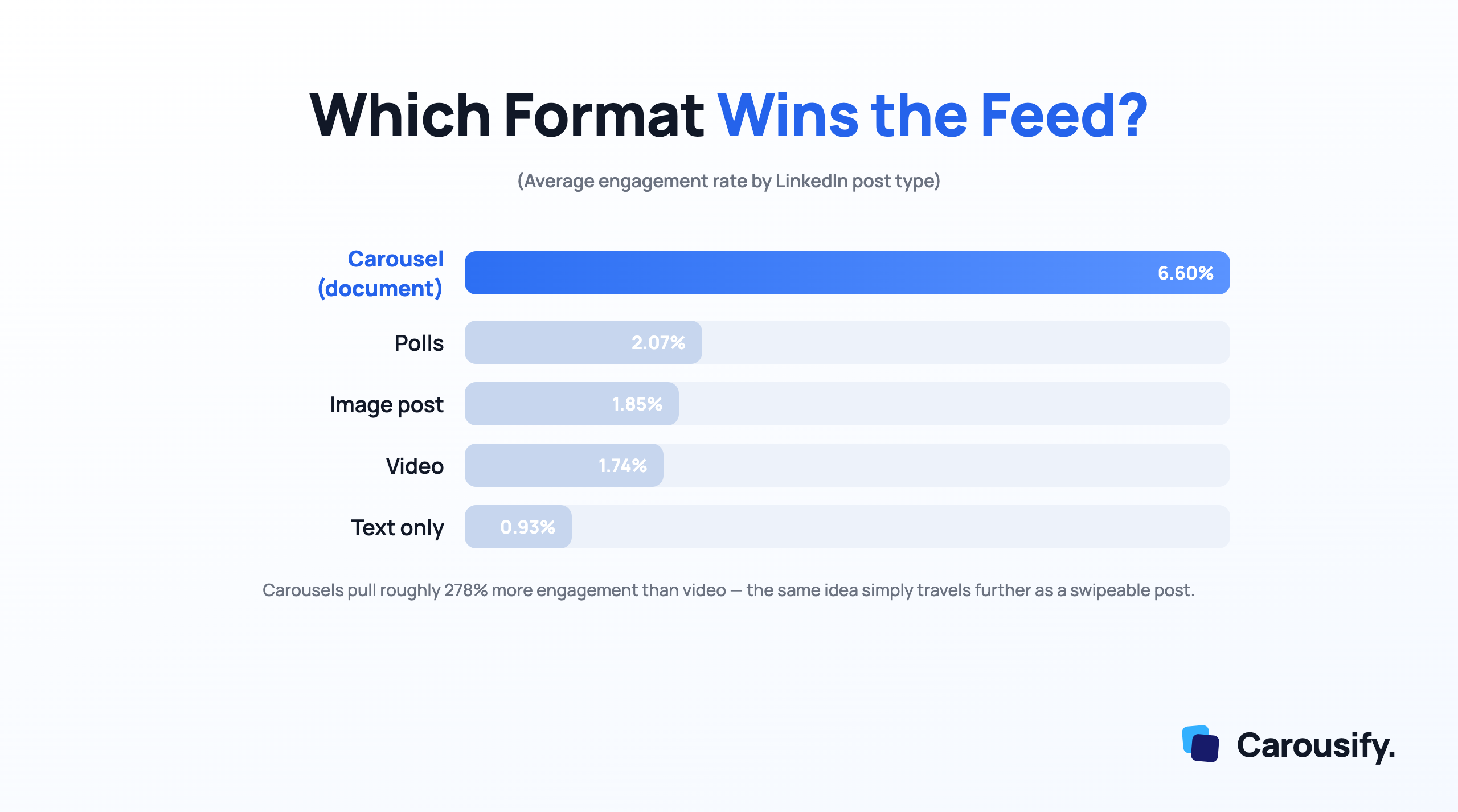
So as you read the ideas below, keep one thing in mind. The teaching and proof ideas — lists, steps, breakdowns, numbers — are the ones to turn into carousels first. That is where the reach is.
Bucket 1 — Teach What You Know
This is the safest, most reliable content on LinkedIn. People follow you to learn something.
1. The step-by-step guide. Break one task you do well into clear steps. "How I plan a week of posts in 30 minutes."
2. The mistake list. Five mistakes people make in your field, and the fix for each. Mistakes get saved more than tips.
3. The before-and-after. Show a messy starting point and a clean result. Resumes, dashboards, designs, spreadsheets — anything visual.
4. The tool breakdown. The exact tools you use for one job, and why. Specific beats generic every time.
These four are carousel gold. Each step or mistake becomes one slide.
Bucket 2 — Tell Your Story
Facts inform. Stories get remembered. This bucket builds the trust that makes people care about your advice.
5. The lesson that cost you. A real failure and what it taught you. Honest beats polished.
6. The turning point. The moment your work or career changed direction.
7. A day in your work. What you actually do, minus the highlight reel.
8. The unpopular path. A choice you made that people doubted, and how it played out.
Keep these as text or single images. Stories do not need slides — they need honesty.
Bucket 3 — Take a Stand
Opinion posts start conversations, and conversations are what the algorithm rewards.
9. The "stop doing this" post. One common habit in your industry you think is wrong.
10. The myth-buster. A widely repeated claim, and why it does not hold up.
11. The hot take. A short, sharp opinion stated plainly. No hedging.
12. The prediction. Where your field is heading in the next year.
A quick warning. Take a real stand, not a fake-controversial one. Readers can tell the difference, and so can the people you want to reach.
Bucket 4 — Show the Proof
Numbers and results pull comments because they are concrete. This is the most under-used bucket, which is exactly why it works.
13. The result breakdown. A specific outcome and the steps behind it. "How this post got 80,000 views."
14. The mini case study. One problem, your approach, the result. Three slides, done.
15. The data point. A surprising stat from your own work or a trusted source, with your take on it.
16. The experiment. Something you tested for a week, and what actually happened.
Pair every claim with a real number or a screenshot. Proof without specifics is just another opinion.
Bucket 5 — Engage the Room
Sometimes the goal is not to teach. It is to get people talking, because reach follows replies.
17. The "what would you add?" post. Share a short list, then ask the room to extend it.
18. The this-or-that. Two options, one question, a clear ask for a vote.
19. The poll. Native polls are quick wins and feed you ideas for the next post.
20. The question you are stuck on. Ask the thing you genuinely want help with. Real questions get real answers.
Use these to fill the gaps between your bigger posts. They cost little and keep you visible.
How to Never Run Out of Ideas Again
Twenty ideas is a strong start. A simple system is what keeps it going.
- Keep a swipe file. When a post stops you scrolling, save it. Not to copy — to study why it worked.
- Repurpose your best one. Your top post from last month can become a carousel, a poll, and a story. One idea, three posts.
- Batch on one day. Writing five posts in one sitting is far easier than one a day. The ideas feed each other.
- Schedule ahead. Once they are written, line them up so a busy week never breaks your streak. Here is how to schedule LinkedIn posts the simple way.
The Fastest Way to Turn These Ideas Into Carousels
Here is the honest catch with carousels. The idea is the easy part. Designing eight clean, on-brand slides by hand in Canva is the part that eats your evening.
That is the exact problem we built Carousify to fix.
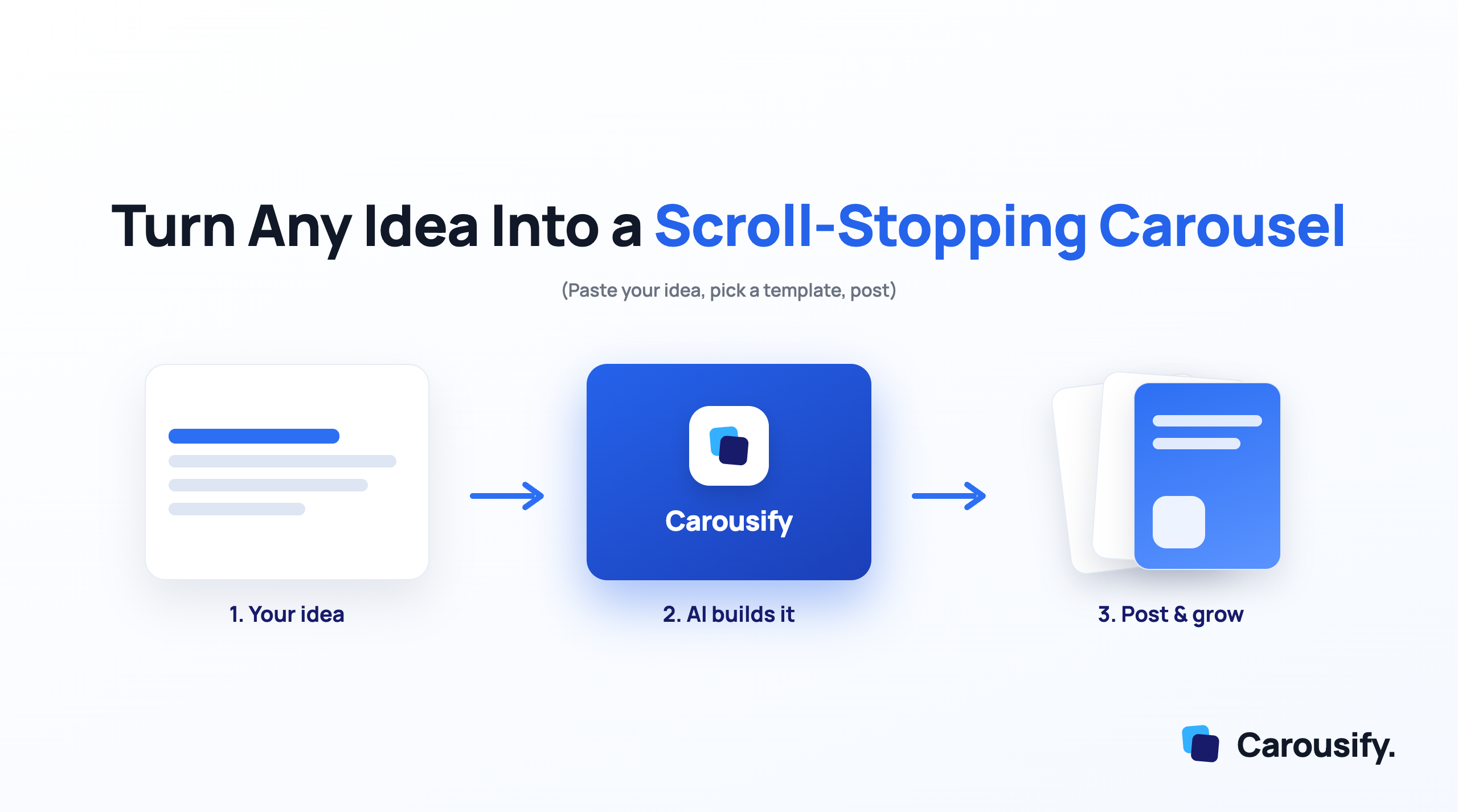
You paste your idea — a topic, a blog URL, or a YouTube link — pick a template, and the AI builds the full carousel. You edit the wording, keep your brand colours, and post.
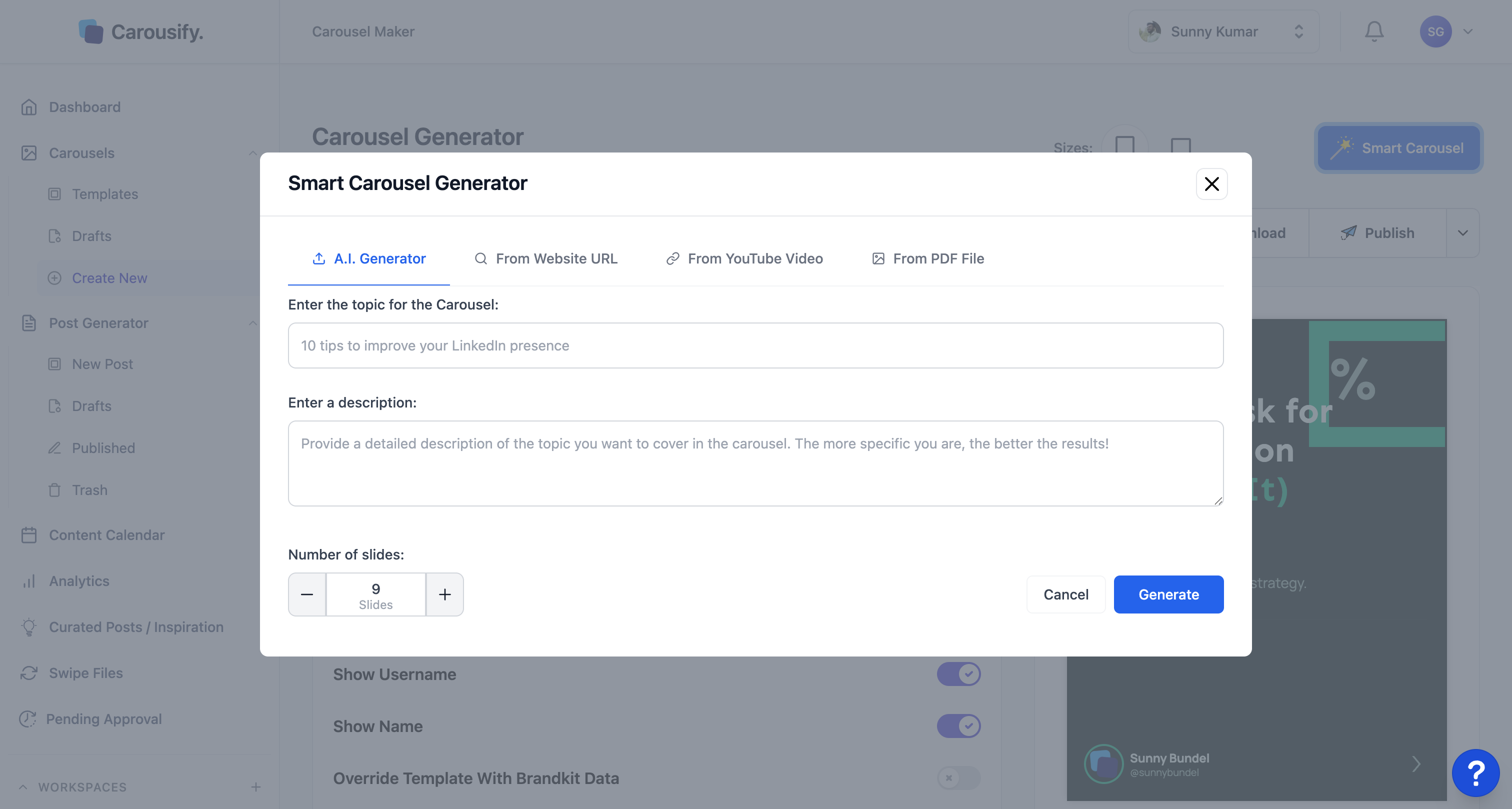
I use it for the teaching and proof posts from this list. A "five mistakes" idea becomes a finished five-slide carousel in a few minutes, not an hour. If you want the full method, here is my guide on creating LinkedIn carousel posts that get engagement.
Short answer: the ideas are free. The time you save building them is the real win.
Frequently Asked Questions
What type of content performs best on LinkedIn?
Carousels (document posts) lead on engagement, averaging around 6.60% — well ahead of video, images, and text. Teaching and proof content fits the carousel format best, which is why it tends to travel furthest.
How often should I post on LinkedIn?
Two to five times a week is the sweet spot for most people. Consistency matters more than volume. A steady rhythm you can keep beats a burst that burns you out in two weeks.
How do I come up with LinkedIn content ideas consistently?
Rotate through five buckets — teach, story, opinion, proof, and engage. Keep a swipe file of posts that caught your eye, and repurpose your best post into new formats instead of always starting from scratch.
Are carousels still working on LinkedIn in 2026?
Yes. Document carousels remain the strongest organic format because every swipe is an engagement signal, and they take up more feed space than any other post. The format is native and free to post.
What should I avoid posting on LinkedIn?
Avoid vague motivation with no point, engagement-bait with nothing behind it, and fake controversy. They get ignored or punished. Lead with something specific the reader can use, save, or argue with.
Summing Up!
The blank page is the only real enemy on LinkedIn. These twenty ideas, split across teach, story, opinion, proof, and engage, are enough to fill weeks of posting without repeating yourself.
Start with the teaching and proof ideas, because those are the ones that turn into high-reach carousels. Then use the quick engagement posts to stay visible in between.
When you are ready to post more, Carousify turns any of these ideas into a finished carousel in minutes. To go deeper, read my guides on increasing your LinkedIn engagement rate, improving your Social Selling Index, and the best LinkedIn carousel generators to try.
Which bucket are you weakest on right now — teaching, story, opinion, proof, or engaging the room? Tell me in the comments and I will throw a few more ideas your way.